DST file viewer
Drop a DST file to see the stitches, the color stops and the real size, before it goes to your machine or your embroidery shop.
DST is the Tajima format, and the file most shops and commercial machines ask for. It is about as plain as an embroidery file gets: needle moves, jumps, trims and color changes. It does not store thread colors, only the points where the thread changes.
That is why a DST can look odd on a screen. The viewer shows each color stop in a different shade so you can see how the design is split up, but the real thread colors come from the person who sews it. Our own example below shows the same design as a DST and, for comparison, as a PES.
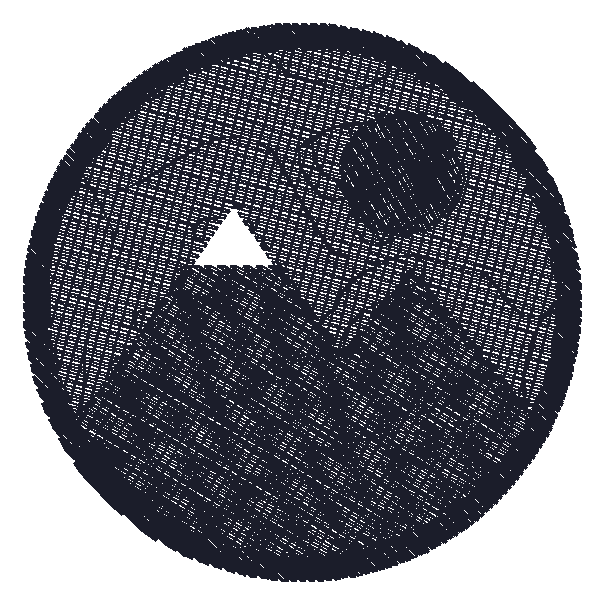
What the viewer shows for a DST file
Our own test design saved as DST: 5,847 stitches, 69.6 × 69.6 mm, and no thread colors, because DST does not store them. Each color stop is shown in a stand-in shade.
Download this DST sample to try itMachines that read DST
From the makers' published specs, these machines on our list read DST:
- Baby Lock Meridian 2
- Bernina 500 E
Getting a DST file onto the machine
- Check the size and stops. Open the DST here and note the width, height and number of color stops. A shop will ask for the threads in that order.
- Send the threads with it. Because DST holds no colors, send a list of thread colors in sewing order with the file. Without it, the machine shows its own defaults.
- Load it the usual way. Commercial machines take DST by USB stick or network; some home machines read DST too. Check that the design fits the hoop or frame first.
Common problems with DST files
The colors are all wrong
That is normal for DST: the file has no thread colors. Match the stops to your thread list rather than to the screen.
Very long jumps or stitches
DST cannot store a single move longer than 12.1 mm, so long moves are split into several. If a design has odd strings across it, the free checker finds long jumps without trims.
It is upside down or mirrored on the machine
The file itself has one orientation. Some machines rotate designs to fit the frame; check the rotation setting on the machine before you sew.
A home machine will not read it
Many home machines read only their maker's format. Convert the DST to PES, JEF, EXP or VP3 with the free converter.
Questions
How do I open a DST file?
Drop it into the viewer on this page. It shows the stitches, color stops and size in the browser, free, without software or an account.
Why does my DST file have no colors?
DST stores where the thread changes, not which thread to use. The colors you see in any viewer are stand-ins. The real colors come from a thread list.
Can I open a Tajima DST file on a Mac?
Yes. This viewer runs in any browser, on a Mac, a Windows computer or a phone.
Can a Brother machine sew a DST?
Some can, such as the Baby Lock Meridian 2 on our list. Most Brother home machines want PES, which the free converter writes from a DST.
Is a DST file the same as a design picture?
No. A DST is needle moves for a machine. A picture has to be digitized into a DST first, which is what BobbinBot's paid flow does.
Convert a DST file, or open another format
Have a picture instead of a file? Make a DST file from your own picture, with a verdict before you pay.