Ink/Stitch for beginners
By BobbinBot. Published .
Ink/Stitch is a free, open-source extension that turns Inkscape drawings into embroidery files. Learn four things first: fill for areas, satin for narrow shapes, running stitch for lines, and the Params window that sets them.
What Ink/Stitch is
Ink/Stitch adds embroidery to Inkscape, the free vector drawing program. You draw or trace shapes in Inkscape, tell Ink/Stitch how to stitch each one, and save the result as PES, DST, JEF, EXP, VP3 or one of many other machine formats. It is free and open source under the GNU GPL version 3, and has install guides for Windows, macOS and Linux.
We know it well because it runs inside BobbinBot: our engine uses Ink/Stitch 3.3.0 to write the stitches of every design. Everything below is what we learned setting it up, with the exact values our engine uses.
The three stitch types
Almost every design is made of three kinds of stitching. Here they are in one small test drawing from our own setup, stitched by Ink/Stitch itself: a 28 mm circle, a satin bar 32 mm long and 6 mm wide, and a 68 mm line.
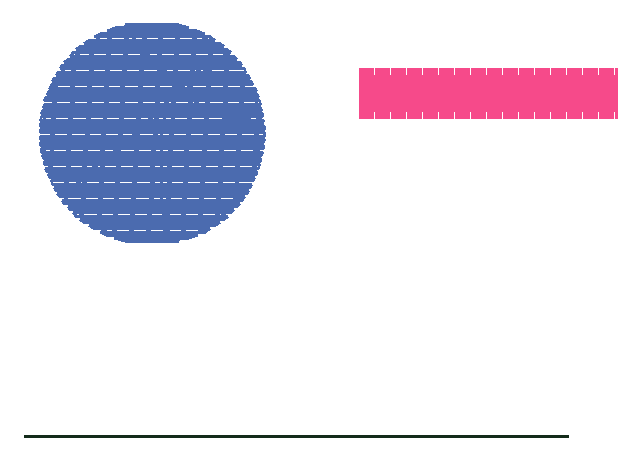
| Stitch type | Made from | Stitches in our test | Use it for |
|---|---|---|---|
| Fill (tatami) | A filled shape | 854 | Areas wider than a satin can cover |
| Satin column | Two rails, or a thick stroke | 225 | Borders, letters and narrow shapes |
| Running stitch | A plain line | 37 | Outlines, fine lines and travel between parts |
The whole drawing came to 1,116 stitches, 74 × 51.6 mm, and Ink/Stitch took 3.2 seconds to write it on our computer. The fill has by far the most stitches of the three, so fills are the first place to look when a design is slow to sew or too dense.
Params: where the settings live
Select a shape and open Extensions › Ink/Stitch › Params. One window holds every setting for that shape, with a live simulation next to it, so you see the stitches change as you edit. Our PNG to DST guide has screenshots of this window and walks through a whole design.
For a first design, change only three things: the fill angle, so neighboring fills do not all run the same way; the row spacing, if a fill looks too dense or too thin; and pull compensation on satins, if columns sew narrower than drawn. Ink/Stitch's documentation explains why the last one matters: satin stitches pull the fabric together, so a column sews narrower than you draw it.
Open the file you made
Drop your Ink/Stitch file here to see the stitches, colors and size before it goes on the machine. Free, and nothing is kept.
The settings our engine uses
These are the values BobbinBot's engine writes into Ink/Stitch for a t-shirt, from engine/bobbinbot/svgdoc.py and config/fabrics.json. They are a reasonable starting point for a knit; other fabrics change the spacing and compensation.
| Setting | Our value | Notes |
|---|---|---|
| Fill method | Tatami fill | Ink/Stitch's standard fill |
| Fill row spacing | 0.4 mm | 0.45 mm on fleece and terry |
| Fill stitch length | Up to 3.5 mm | |
| Fill angle | Changes by 15° from shape to shape | 0° is horizontal, counter-clockwise from there |
| Fill underlay | On, rows 1.4 mm apart, 0.4 mm inside the edge | Ink/Stitch turns underlay on by default |
| Satin zigzag spacing | 0.4 mm | |
| Satin pull compensation | 0.2 mm | 0.1 to 0.3 mm by fabric |
| Satin underlay | Center walk, 2 mm stitches | A line down the middle, to hold the satin up |
| Running stitch length | 2 mm | For outlines and thin lines |
Lettering
Ink/Stitch comes with a library of embroidery fonts, already digitized as satin and fill, under Extensions › Ink/Stitch › Lettering. Each font has its own smallest and largest size. Our engine uses three of them for names, and our guide on how small embroidered text can be shows where each one stops.
A first project
- Install Inkscape, then Ink/Stitch, following Ink/Stitch's install guide for your system.
- Start with a logo of two or three flat colors, not a photo.
- Trace it, delete the picture, and set the real size in millimetres.
- Open Params, keep the defaults, and watch the simulation.
- Save a copy in your machine's format, and keep the SVG for changes.
- Open the file in a viewer to check the size and colors, then sew a test.
Is Ink/Stitch worth learning?
If you will digitize often, yes. It is free, it handles every common format, and it gives you control over every stitch decision, which no automatic tool does. The cost is time: each shape needs a stitch type, a direction and settings, and getting a design to sew cleanly takes test sew-outs.
If you need one file for a logo or a name now, an automatic tool is quicker. BobbinBot runs Ink/Stitch underneath with the settings above and shows you a verdict before you pay. Our guide Can AI digitize embroidery? is honest about where that works and where it does not.
Questions
Is Ink/Stitch free?
Yes. It is open-source software under the GNU GPL version 3, and so is Inkscape, which it runs inside.
Does Ink/Stitch work on a Mac?
Yes. Ink/Stitch has install guides for macOS, Windows and Linux.
Can Ink/Stitch digitize a picture automatically?
Not in one click. You trace the picture in Inkscape and choose stitches yourself, though tools like Auto-Route Satin Columns take over some steps.
What file formats can Ink/Stitch save?
Many, including PES, DST, JEF, EXP, VP3, XXX, U01, PEC and TBF. You pick the format in File › Save a Copy.
Which Inkscape version did you use?
Inkscape 1.2.2 with Ink/Stitch 3.3.0. Menus can move a little between versions.
Why are my Ink/Stitch columns narrower than I drew them?
Because the thread pulls the fabric in. Add pull compensation to the satin in Params; our engine uses 0.1 to 0.3 mm by fabric.
Sources
Related
Turn your picture into a stitch file
Upload a logo, a drawing or a name. You see the stitches and a green, yellow or red verdict before you pay, and every machine format comes in one download.