Why does machine embroidery pucker?
By BobbinBot. Published .
Embroidery puckers when the stitches pull the fabric tighter than the fabric around them can follow. The fixes are a firmer stabilizer, hooping smooth but not stretched, a lighter design, and pull compensation in the file.
What pulling does
Every stitch pulls a little. Ink/Stitch's own documentation puts it plainly: fill stitch can pull the fabric together, resulting in a shape narrower than you draw, and satin stitches do the same to a column. Thousands of stitches pulling in the same direction draw the fabric in under the design, and the fabric around it, which is not pulled, ripples.
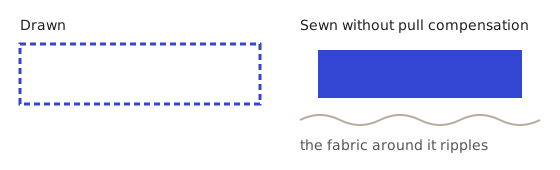
Causes and fixes
| Cause | What you see | Fix |
|---|---|---|
| The wrong stabilizer | Puckers on a t-shirt or hoodie, often worse after the first wear | Cut-away under knits; see the stabilizer table. |
| Fabric stretched in the hoop | Ripples all around the design once it is unhooped | Hoop smooth, never stretched. Hoop the stabilizer with the fabric. |
| Too many stitches in one spot | A stiff, puckered patch in the densest area | Make the design less dense there, or use a firmer stabilizer. |
| No pull compensation | Columns narrower than planned, gaps between shapes | Set pull compensation in the design; our engine does it per fabric. |
| A big fill on light fabric | The whole design cups or draws in | Use a smaller fill, a lighter fabric setting, or a firmer stabilizer. |
| The fabric shrank in the wash | Flat after sewing, puckered after washing | If the fabric can shrink, wash and dry it before you embroider. |
Same picture, three fabrics
Our engine changes the design for the fabric, not just the advice. Here is our own strawberry drawing at 60 mm on three items. The shape and size stay the same; the stitching changes.
| Item | Fabric | Fill row spacing | Underlay row spacing | Pull compensation | Stitches |
|---|---|---|---|---|---|
| T-shirt | {{runs.t-shirt.fabric}} | {{runs.t-shirt.row_spacing_mm}} mm | {{runs.t-shirt.underlay_row_spacing_mm}} mm | {{runs.t-shirt.pull_compensation_mm}} mm | {{runs.t-shirt.stitches}} |
| Hoodie | Fleece knit | 0.45 mm | 1.5 mm | 0.3 mm | 3,788 |
| Patch | Twill or felt | 0.4 mm | 1.2 mm | 0.1 mm | 4,184 |
Fleece gets rows further apart, so the hoodie version has the fewest stitches, and it gets the most pull compensation of the three. The twill patch keeps close rows and a denser underlay, which is why it has the most stitches, with the least compensation.
Get a design made for your fabric
Pick the item and BobbinBot sets the spacing, underlay and pull compensation for its fabric, with the stabilizer in the kit. Your first design is free.
How our engine tries to prevent puckering
None of this replaces a test sew-out. Fabric, thread and machine all vary, and a test on scrap is the cheapest way to find out.
- An underlay under every fill, set 0.4 mm inside the edge. Ink/Stitch's documentation describes fill underlay as stitching 90° offset from the final fill.
- Pull compensation on satin columns, from 0.1 to 0.3 mm depending on the fabric.
- A density check: the design is divided into 2 mm squares, and it is flagged when enough squares hold more than 3 times the median number of stitches.
- A stabilizer, needle and hooping note for the item in every sew-out kit.
If it has already puckered
The stitches have already drawn the fabric in, so the fix is in the next sew-out. Note what you used, change one thing at a time from the table above, and sew a new test. The free checker shows whether the file itself has crowded or tiny stitches.
Questions
Why does my embroidery pucker after washing?
Often the fabric shrank around the stitches, or a tear-away was used where cut-away was needed. Wash the garment before embroidering, and use cut-away on knits.
How do I stop embroidery puckering on t-shirts?
Use cut-away stabilizer, hoop the shirt smooth without stretching it, and avoid very dense fills. Our t-shirt settings add pull compensation and an underlay.
Does stabilizer stop puckering?
It is the biggest single fix, but not the only one. Hooping, design density and pull compensation matter too.
What is pull compensation?
A setting that makes shapes slightly wider in the file, so they sew to the planned size after the thread pulls the fabric in.
Why does my lettering pucker?
Small satin letters pull hard in a small area. Size the letters up, use a firm stabilizer, and keep the fabric smooth in the hoop.
Sources
Related
Turn your picture into a stitch file
Upload a logo, a drawing or a name. You see the stitches and a green, yellow or red verdict before you pay, and every machine format comes in one download.